How to reduce STL file size
A large STL can be inconvenient to share, store, or open in another application. Before reducing it, separate two questions: is the file large because it stores numbers as text, or because its surface contains many triangles? The right starting point depends on that difference.
Open the STL workspaceCheck the source before changing it
Open one ASCII or binary STL in Voloomy and note the source size and triangle count. Look at the bounds, open edges, and zero-area triangles. These observations help you recognize an unexpected result later; they do not establish that the model is ready to print.
ASCII files can become smaller through binary export even when the triangle count stays the same. A dense binary model usually needs fewer triangles to become substantially smaller. Keep the source file so you can compare and return to it.
Start with a moderate size target
Choose a target in MB or use a percentage preset. The presets refer to source file bytes, not directly to triangle count. This distinction matters for ASCII input, where binary export may already account for much of the size difference.
Begin with a moderate reduction and the balanced detail setting. Keep open-border protection enabled if the model has important boundary points. Run the reduction, compare the silhouette and useful features, then try another setting if needed. A very small target can demand more detail loss than your intended use allows.
Read a measured before-and-after example
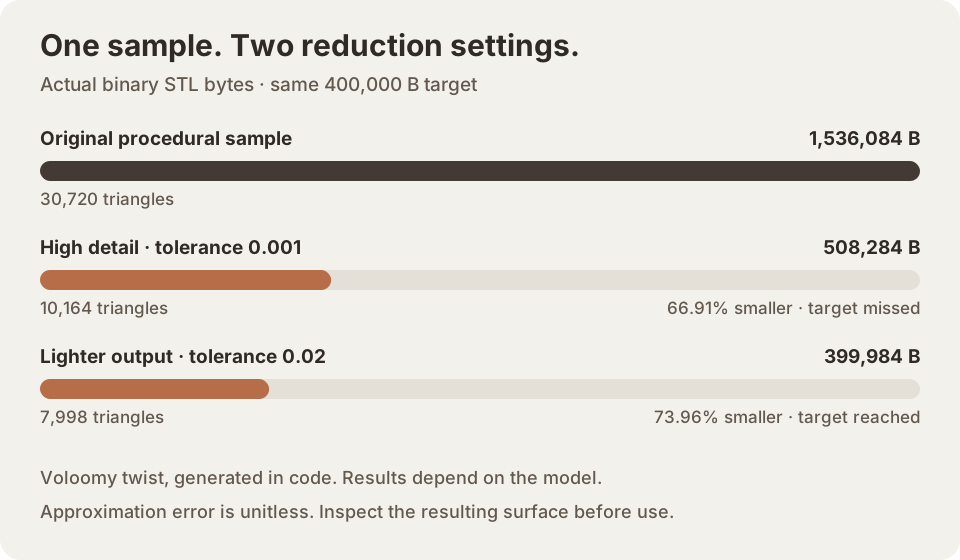
The example below comes from a procedurally generated model processed with Voloomy. It is a reproducible illustration, not a customer result or a prediction for your file. Compare both the byte counts and the triangle counts: a file-size percentage alone does not describe which surface details changed.
The procedural sample starts at 1,536,084 bytes and 30,720 triangles. With a 400,000-byte target and open-border protection on, tolerance 0.001 produced 508,284 bytes / 10,164 triangles; tolerance 0.02 produced 399,984 bytes / 7,998 triangles. High detail missed the target; the lighter run reached it. The output byte counts were taken from actual encoded STL files.
The same settings can behave differently on a smooth shell, a scan, or a part with thin fins. Judge the output against the features your own model needs.
Understand a missed target
A target is a request, not a guaranteed output size. Detail tolerance, protected boundaries, and the structure of the mesh can prevent the reducer from reaching it. Voloomy reports the actual encoded byte count and identifies a missed target instead of presenting it as reached.
You can try a less aggressive target or another detail setting. If the model is already small or has little redundant surface detail, keeping it unchanged may be the better choice. STL reduction does not require reaching an arbitrary percentage.
Download and check the actual result
Download the binary STL and optionally its JSON analysis report. Reopen the STL in the slicer or CAD software that will use it. Confirm dimensions, holes, thin features, and the sliced layers. STL does not store units, and Voloomy does not validate wall thickness, self-intersections, or manufacturing tolerances.
Processing stays in browser memory; download before closing the tab. The technical input limit is 25,000,000 bytes and 500,000 triangles. For phones and tablets, files up to 5 MB and 100,000 triangles are recommended. Processing time still depends on the device and model.