STL triangle reduction: balancing file size and detail
Triangle reduction replaces a surface mesh with one that uses fewer faces. It can make an STL smaller, but it is lossy: the resulting surface may differ from the original. Choosing useful settings starts with identifying which features matter, rather than aiming for the lowest triangle count.
Open the STL workspaceDecide which features must remain useful
Look beyond the overall shape. A broad curved surface, a shallow engraved letter, a small hole, and a thin fin can respond differently to reduction. A result that looks smooth when zoomed out can still lose a feature you need for assembly or appearance.
Inspect the original first and identify the areas to compare. There is no universal triangle count that makes every model suitable for printing. A simple shape may need few faces; a detailed scan may need many more. The purpose of the model determines which changes are acceptable.
Treat detail tolerance as a relative setting
Voloomy's detail choices control the simplifier's normalized error tolerance. A tighter tolerance can preserve more detail while making the size target harder to reach. A larger tolerance allows more change; it does not guarantee that every attempted target becomes achievable.
The reported approximation error is a unitless estimate normalized to the model's size. It is not a certified maximum surface deviation, a distance in millimetres, or a manufacturing tolerance. Use it to understand the run alongside visual inspection, not to approve the fit of a mechanical part.
Compare actual counts, then inspect the surface
This example uses a procedurally generated model and a real Voloomy reduction. It shows what happened for that source and those settings. It does not establish a quality score or a reduction percentage that another model will match.
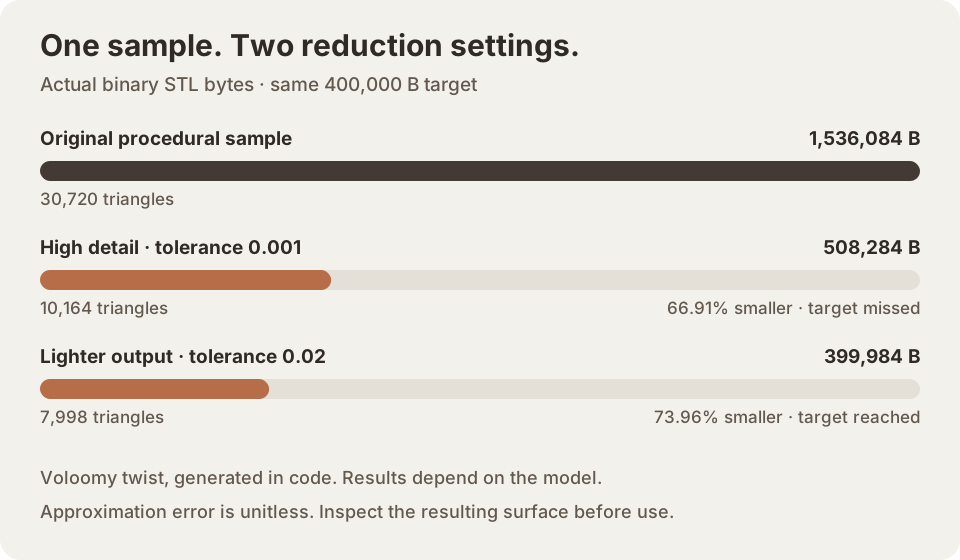
The procedural sample starts at 1,536,084 bytes and 30,720 triangles. With a 400,000-byte target and open-border protection on, tolerance 0.001 produced 508,284 bytes / 10,164 triangles; tolerance 0.02 produced 399,984 bytes / 7,998 triangles. High detail missed the target; the lighter run reached it. These are normalized, unitless error settings, not physical tolerances or certified surface-deviation limits.
Compare the original and result with the same camera angle and zoom. Check the silhouette, curved edges, openings, and small features. Rotate the view so that an apparently good front view does not hide a poor side or underside. A smaller download is useful only if the output still serves your task.
Protect boundaries when they matter
Open-border protection keeps boundary points fixed during reduction. It can be useful for an open surface whose edge shape matters. Keeping it enabled may limit how much the mesh can shrink. Turning it off is a tradeoff to inspect carefully, not a general instruction for obtaining a better result.
Boundary protection is not hole filling or mesh repair. Edge analysis also has a limited meaning: a closed-edge result does not prove correct face orientation, absence of self-intersections, adequate wall thickness, or printability. Correct problematic source geometry in an appropriate modelling tool before relying on it.
Run a controlled comparison before export
Change one setting at a time so you can understand its effect. Voloomy reduces from the loaded source rather than repeatedly simplifying the previous result. Keep the original file and note the settings for a result you want to retain. The JSON report records the settings and actual output counts for that run.
Finally, download the STL and reopen it in your intended slicer or CAD application. Confirm the units and dimensions there, inspect layer previews if printing, and check important interfaces. Visual comparison and an approximation metric help you choose a candidate; they do not replace validation for the intended use.